15% OFF
Drone Part
Full specifications, what's in the box & FAQs
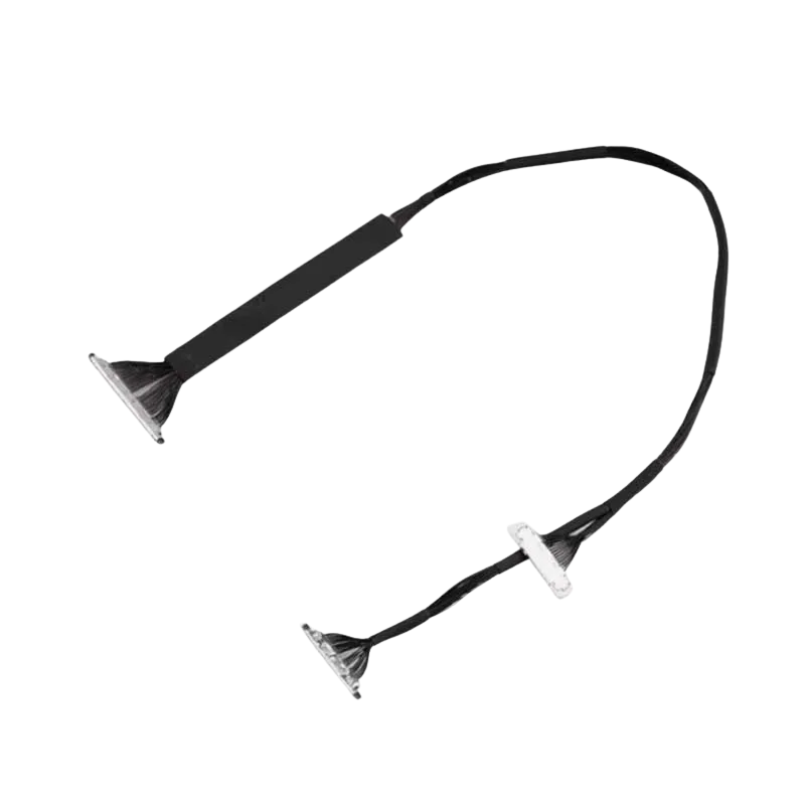
Behind every beautiful aerial shot captured by your DJI Air 2S, there’s a silent hero working in the background—quietly passing signals, handling communications, and making sure the camera listens when you tell it to move. That unsung hero is the DJI Air 2S PTZ Camera Signal Transmission Cable. It might not look like much at first glance, but without it, your camera would just sit there like a statue, refusing to pan, tilt, or obey any commands. This cable is the invisible link between your drone’s brain and its cinematic eyes—small in size, but mighty in impact.
When you’re flying high and trying to capture buttery-smooth footage, there’s no time for delays or lost signals. This cable ensures high-speed, reliable communication between the drone’s flight system and its PTZ (Pan-Tilt-Zoom) camera. Whether you’re tilting for a cinematic landscape or snapping a fast-moving subject, this cable delivers signals without any fuss or lag. It acts like a direct hotline between the controller and the camera, whispering instructions at lightning speed so you always get the perfect angle at the perfect time—no missed moments or camera confusion.
The DJI Air 2S PTZ Camera Signal Transmission Cable is built to plug in tightly and stay that way. It’s designed with precision-molded connectors that fit perfectly into the gimbal port and mainboard without requiring you to force anything. Once it’s connected, it doesn’t wiggle, loosen, or disconnect mid-flight like some cheap third-party alternatives. Even when the drone is zipping through the wind or dancing in the air, this cable holds steady. It’s like a firm handshake between your camera and drone’s brain—one that says, “I got you, bro.”
Even though this cable looks thin and delicate, it’s engineered to survive the real-world wear and tear of serious drone flying. It has a strong internal structure and flexible insulation that allows it to bend, curve, and flex during installation and flight without snapping or fraying. This means you can route it through tight spots, loop it around corners, or install it without worrying about breakage. It’s like yoga for cables—stretchy, bendy, and always returning to form when you need it to perform.
The cable is designed not only to transmit data but also to work in harmony with your gimbal’s mechanics. It sits quietly in place, without adding weight or tension that could interfere with the camera’s motion. That means you get clean, balanced movements whether you’re filming a slow pan or a sudden tilt. No jerks, no cable drag—just buttery-smooth footage. It’s the difference between a camera that flows like a crane shot and one that jitters like a nervous squirrel on caffeine.
This is not some generic knockoff or a one-size-fits-all solution—it’s made specifically for the DJI Air 2S. That means the length is just right, the connectors match perfectly, and the performance is fully optimized for this model. Whether you’re replacing a damaged original or upgrading from a flimsy aftermarket cable, this official part ensures your drone’s camera control system works as intended. No weird compatibility issues, no DIY soldering—just plug in and fly like nothing ever happened.
Since this cable is small and delicate, it’s best to avoid any rough cleaning methods. Instead, take a soft paintbrush or a small camera air blower and gently sweep away any dust or particles. Think of it like brushing the crumbs off your shirt—quick, gentle, and very effective.
The cable has tiny connectors at each end that need to stay clean for smooth performance. Take a clean, dry microfiber cloth and lightly wipe the ends of the cable. Avoid using water or any cleaning liquid here—this cable is more techy than messy.
While you’re cleaning, be careful not to bend, fold, or twist the cable too much. This wire is meant to stay straight and smooth. Just lay it flat on a clean surface, clean it calmly, and treat it like a fragile noodle.
In case there’s some sticky mess or residue on the surface, take a cotton swab and dip it in a very small amount of isopropyl alcohol. Dab it gently, don’t flood the area. Let it dry completely before using the cable again.
Even if you used only a little moisture during cleaning, make sure the cable is completely dry. Wait for a few minutes in a cool, dry place before putting it back into action. No one wants a short circuit during takeoff!
This cable may look small, but it plays a big role in your drone’s camera. When removing or inserting it, always hold the connector ends and not the cable itself. No need to show muscle strength—it prefers a soft touch.
When the cable is not attached to the drone, store it in a sealed bag or small case. Don’t leave it lying around on the table where dust or hair can stick to it. Treat it like a delicate phone charger—it works best when kept clean and safe.
Moisture can damage the internal circuits of this tiny cable. Keep your hands dry when handling it, and don’t bring it near wet cloths or liquids. This cable likes staying dry, just like your socks during rainy season.
Never fold or press down hard on this cable. It’s not a piece of paper that can be creased and unfolded. Bending it too much can break its inner wires. Always place it flat or loosely coiled in a straight line.
Every now and then, inspect the ends of the cable. Make sure the gold connectors are clean and the pins are not bent. If you notice damage, replace it before it causes connection issues with your drone.
Always power off your drone completely before touching this cable. It’s not safe to mess with connectors while the drone is powered on. Think of it like changing a lightbulb—you always switch the power off first.
This cable is made to fit in a specific way. Make sure you plug each end into the correct port. Don’t push it in the wrong slot or upside down. It’s not a puzzle, and it doesn’t like surprises.
If the cable has cracks, bends, or broken pins, replace it with a new one. Don’t try fixing it with tape or glue. That may cause more harm than good and can affect your camera signal mid-flight.
Magnets or static electricity can affect its performance. So don’t place it near speakers, TVs, or heaters. Keep it in a calm, cool place, and it will serve you better and longer.
If you’re new to drones and not confident about connecting this cable, ask for help from someone who knows. It’s better to be safe than sorry, especially with parts that control your camera view.
The DJI Air 2S PTZ Camera Signal Transmission Cable may be small, but it plays one of the most critical roles in your drone’s performance. Without it, your gimbal doesn’t listen, your camera won’t respond, and your footage ends up sad and still. This cable is the vital lifeline that lets your drone’s brain and eyes stay in sync, delivering the smooth cinematic shots you bought the Air 2S for in the first place. It’s tough, precise, and made to fit like it was born inside the drone.
So if your camera’s gone quiet or your gimbal’s giving you the silent treatment, swap in the DJI Air 2S PTZ Camera Signal Transmission Cable and bring the conversation back. Your drone deserves it—and your footage demands it.
| General | |
|---|---|
| Product Name | DJI Air 2S PTZ Camera Signal Transmission Cable |
| Compatible Drone | DJI Air 2S |
| Product Type | Internal signal transmission cable for PTZ camera |
| Intended Use | Replacement part for camera signal/data connection |
| Cable Type | Flat flexible ribbon cable (FFC) |
| Material | Polyimide with copper conductor traces |
| Length | Custom-fitted for Air 2S internal layout |
| Connector Type | Factory-matched plug-in connectors |
| Flexibility | High-flex rating for movement endurance |
| Shielding | Anti-interference shielding for signal clarity |
| Signal Type Supported | Video, control, and telemetry signals |
| Camera Compatibility | Works with Air 2S PTZ gimbal module |
| Installation Area | Runs internally from gimbal to flight board |
| Installation Difficulty | Moderate (requires drone disassembly) |
| OEM Standard | Yes, equivalent to original DJI parts |
| Durability | Designed for frequent gimbal movement |
| Operating Conditions | Stable under flight vibration and moderate heat |
| Package Contents | 1 × PTZ Camera Signal Transmission Cable for DJI Air 2S |
| Weight (Approx.) | <10 grams |
No customer reviews yet. Be the first to review this product.
We are here to help you with any question.