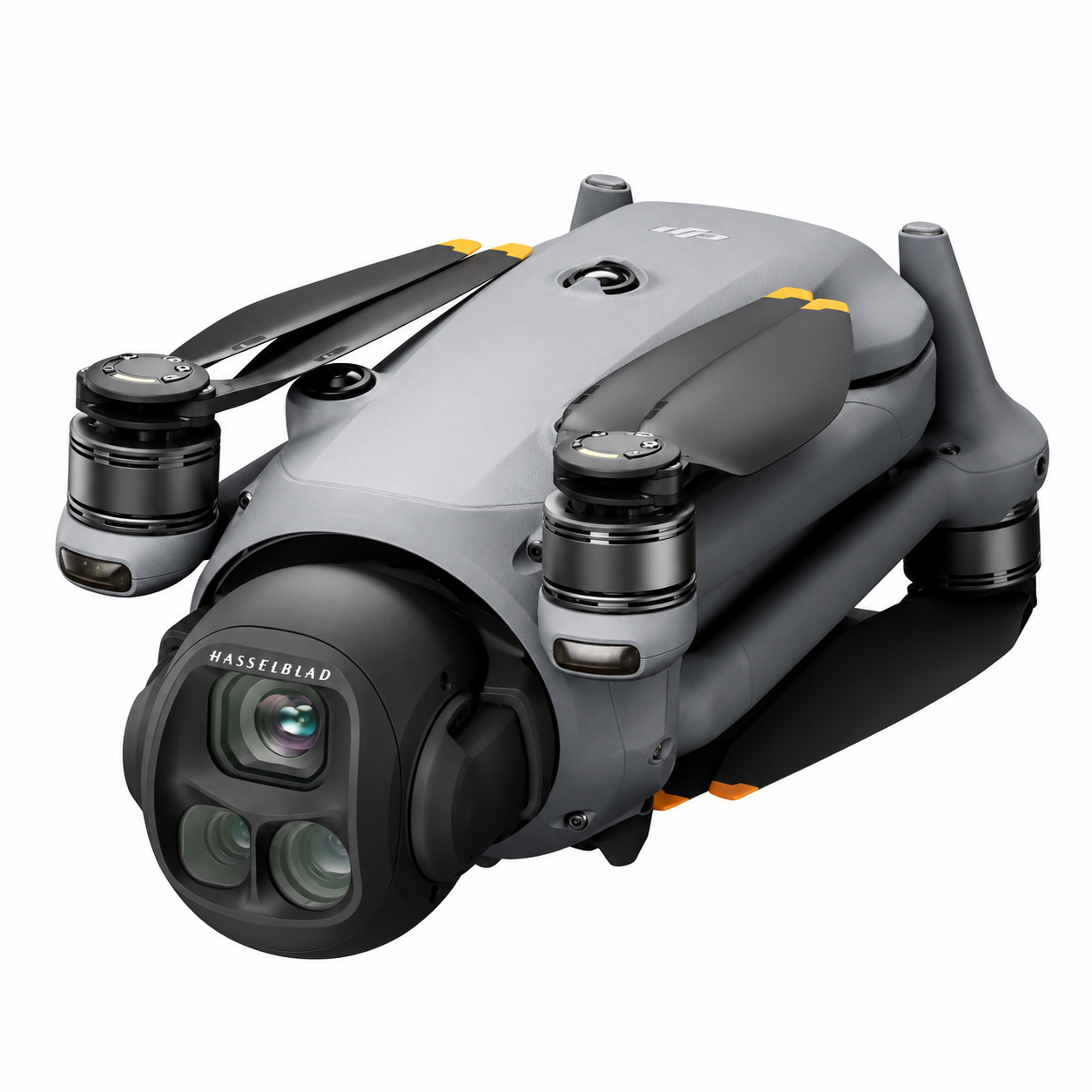
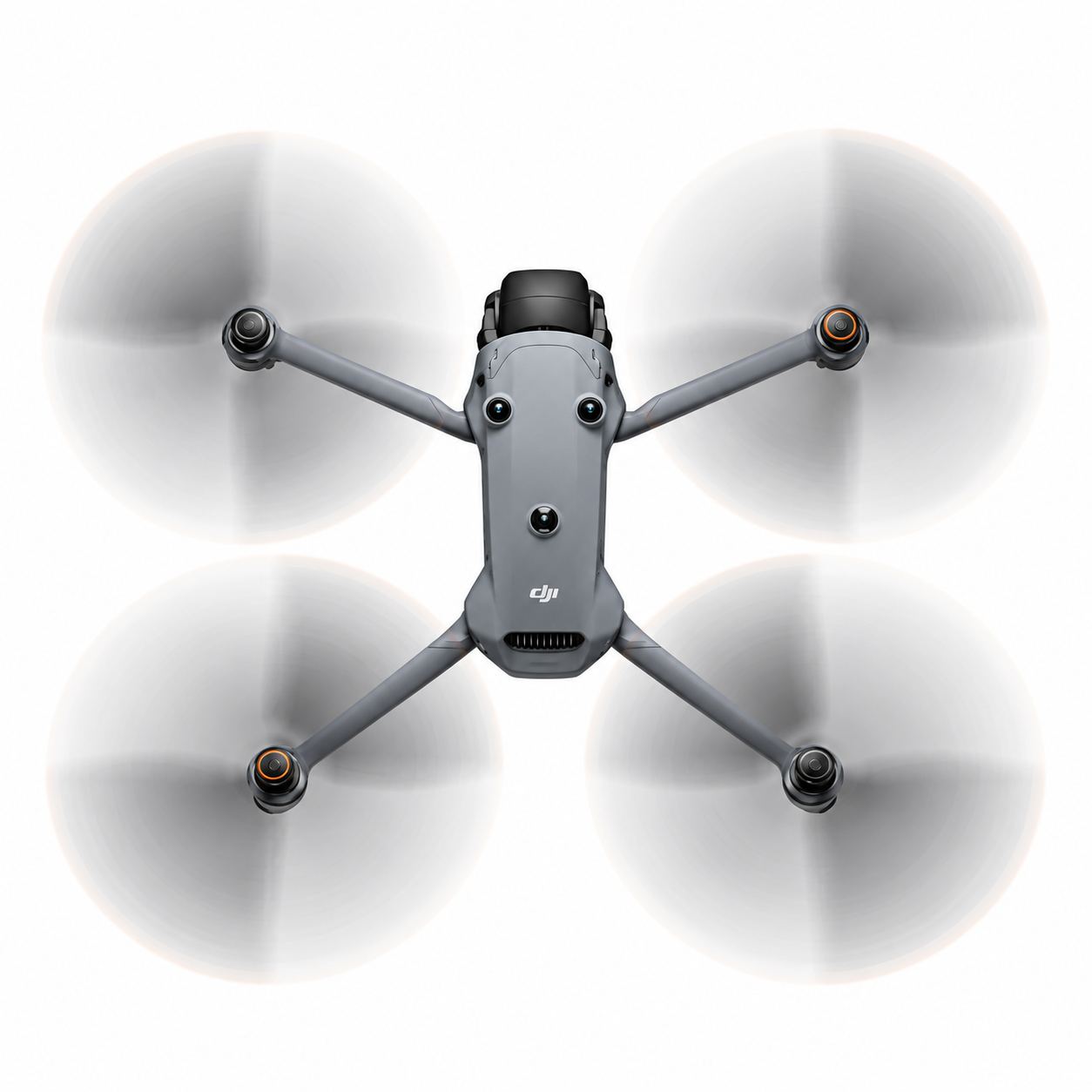
- Takeoff Weight: Approx. 1063 g
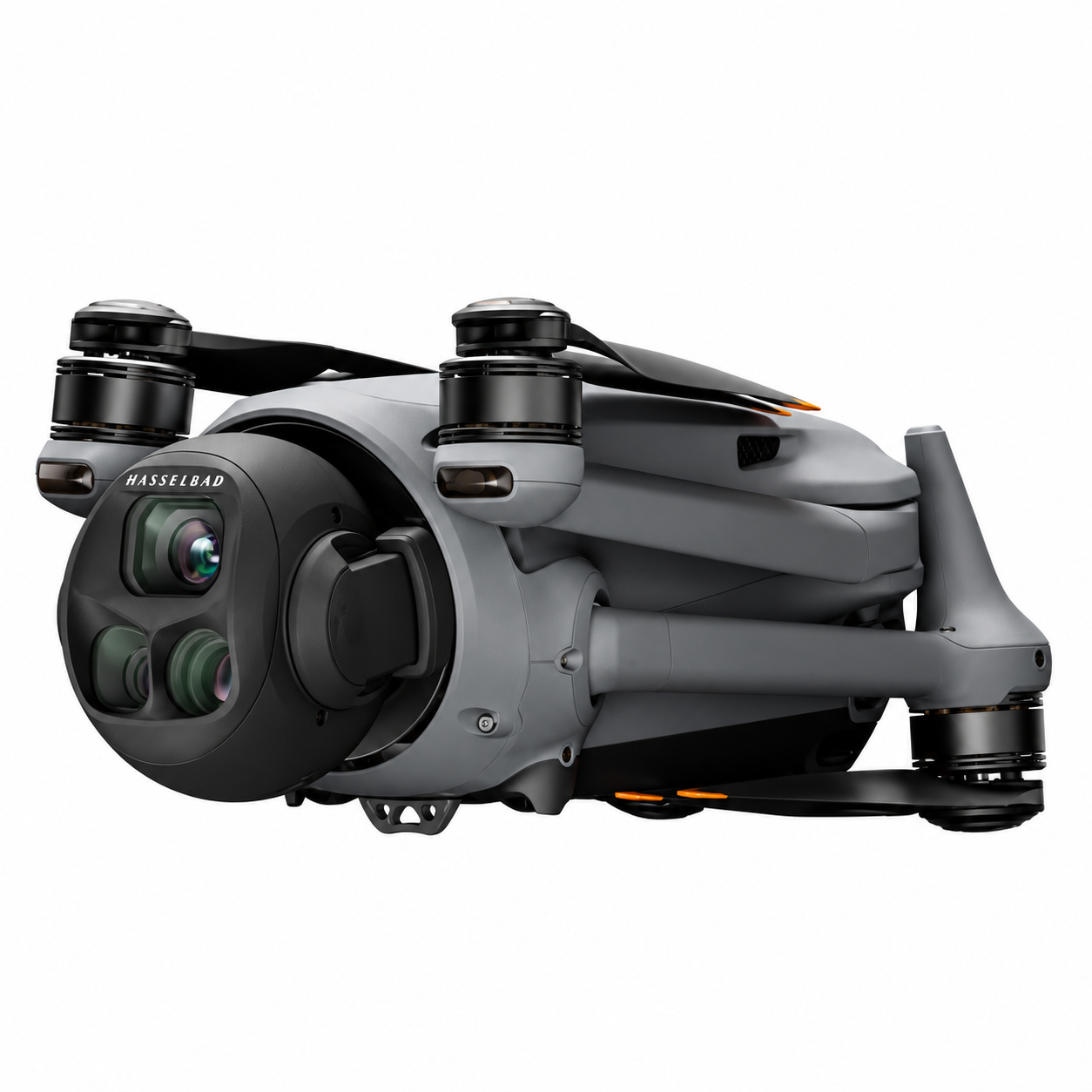
- Folded Dimensions: 257.6×124.8×106.6 mm (with propellers)
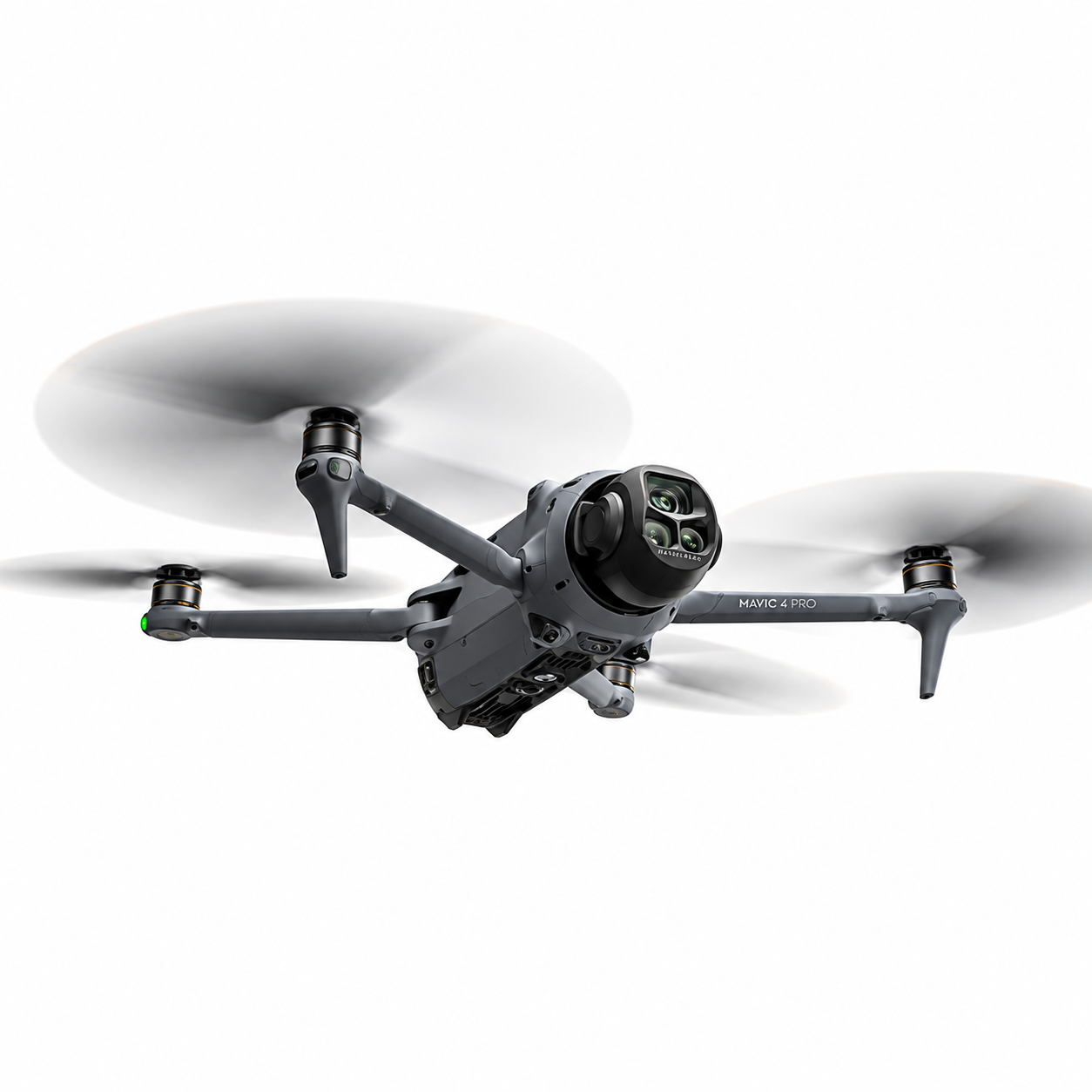
- Unfolded Dimensions: 328.7×390.5×135.2 mm
- Max Flight Time: Approx. 51 minutes
- Max Flight Distance: 41 km
- Max Horizontal Speed: 25 m/s (Sport Mode)
- Max Wind Resistance: 12 m/s
- Operating Temperature: -10° to 40° C
- Internal Memory: 512 GB (approx. 460 GB available)
- Main Camera Sensor: 4/3 CMOS, 100 MP (Hasselblad)
- Tele Camera Sensor: 1/1.5-inch CMOS, 50 MP
- Medium Tele Camera Sensor: 1/1.3-inch CMOS, 48 MP
- Video Resolutions: Up to 6K/60fps (main), 4K/120fps (all cams), FHD/240fps
- Zoom Range: Up to 24x Digital Zoom
- Gimbal: 3-axis Stabilization
- Obstacle Sensing: Omnidirectional with LiDAR
- Transmission System: O4+ with 1080p live view
- Max Transmission Range (FCC): 30 km
- Battery Capacity: 6654 mAh (95 Wh)
- Remote Controller: RC Pro 2 with 7″ Mini-LED Touchscreen
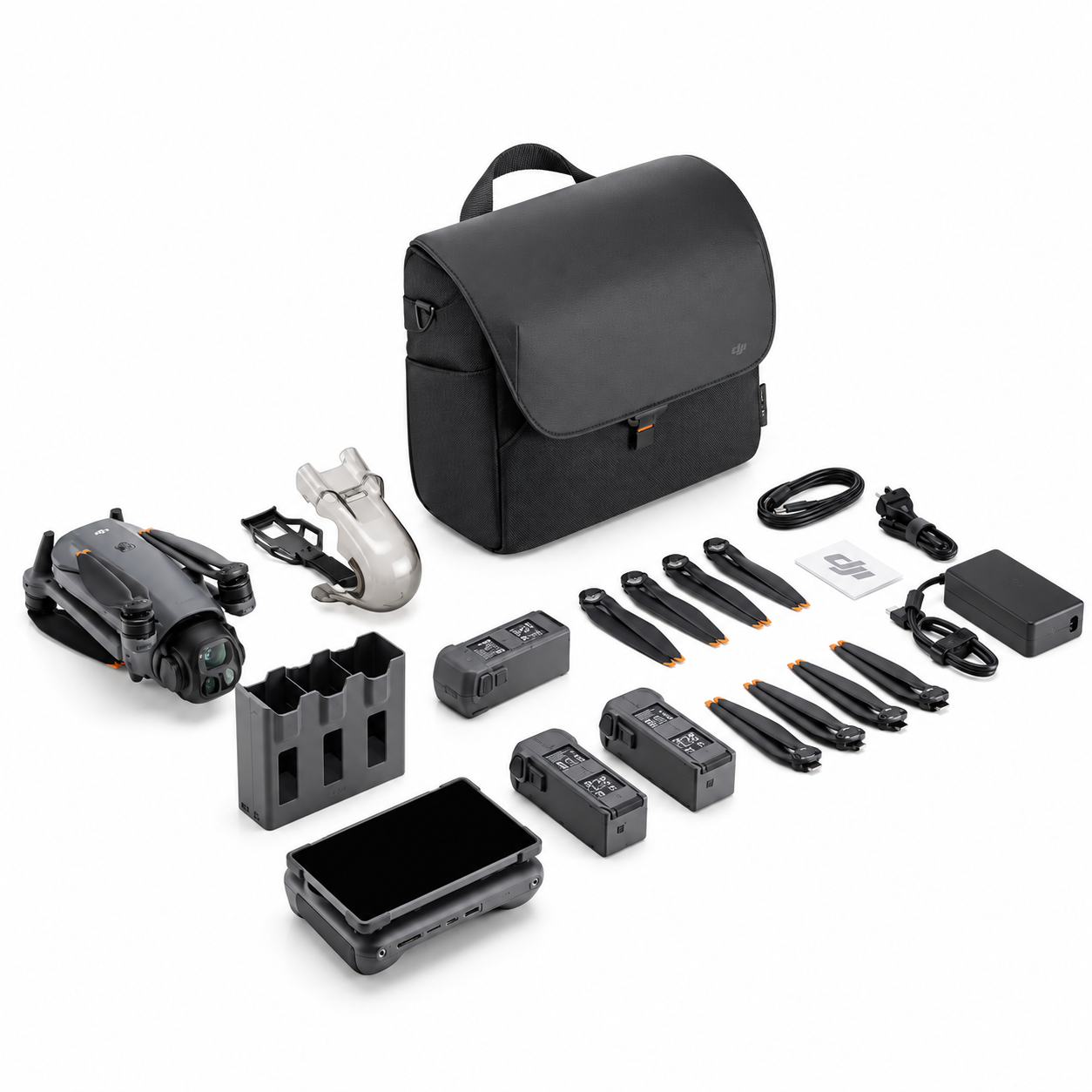
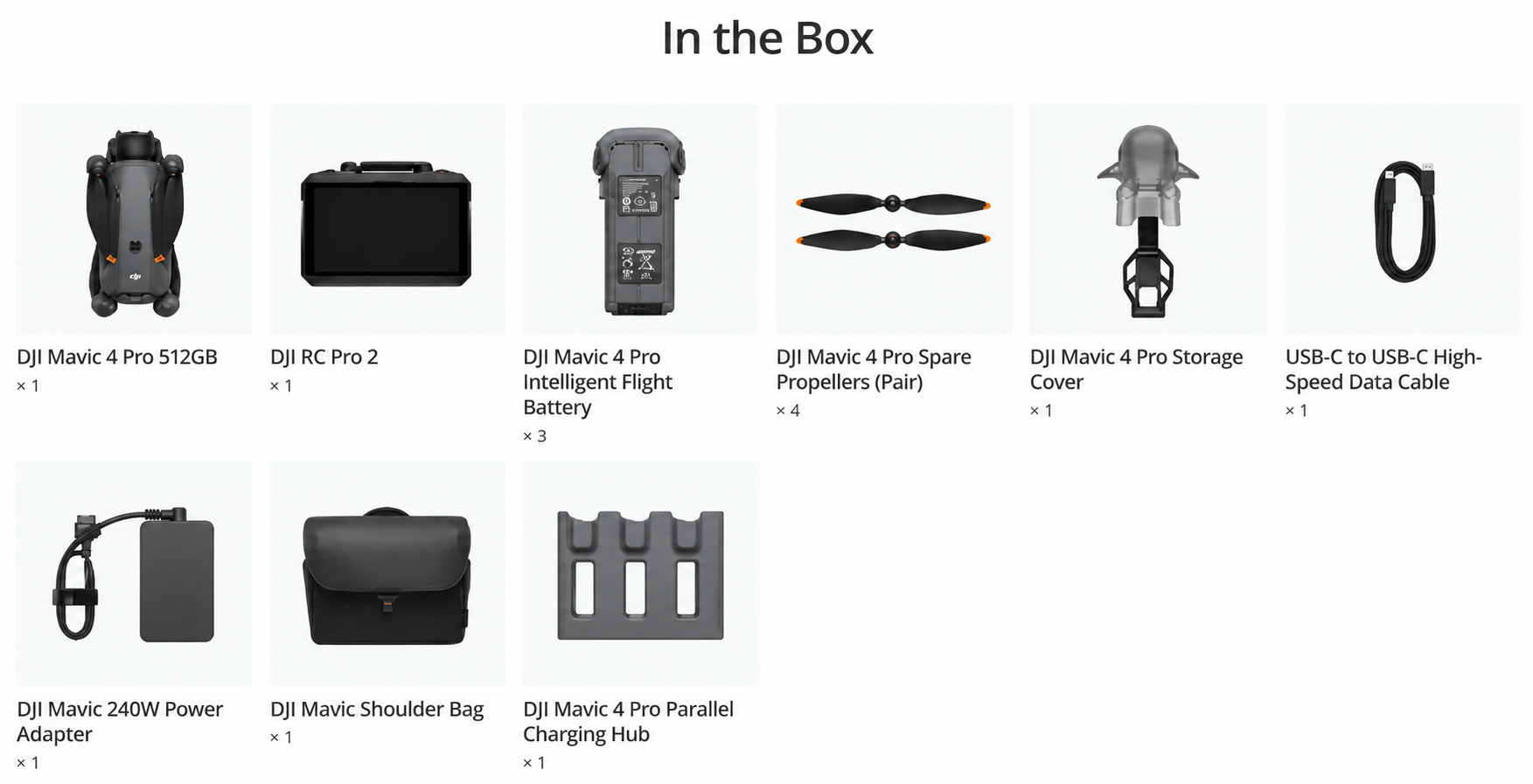
- Creator Combo Includes: Drone (512GB), RC Pro 2, 3 Batteries, 4 Propellers (Pair), Charging Hub, 240W Charger, Bag & Accessories
DJI Mavic 4 Pro Drone – 512GB Creator Combo with 6K Hasselblad Camera, Omnidirectional Sensing, and Pro-Grade Performance
When professional creativity meets powerful engineering, you get the DJI Mavic 4 Pro—a flagship drone designed for creators who demand more: more resolution, more flight time, more control, and more possibilities. Now available as part of the all-in-one 512GB Creator Combo, this powerhouse package includes everything you need to shoot, edit, and deliver cinematic aerial content at scale.
At the heart of the Mavic 4 Pro is its revolutionary triple-camera system, led by a Hasselblad-engineered 100MP sensor capable of shooting stunning 6K/60fps video. Complemented by dual telephoto cameras, ultra-stable gimbal mechanics, and LiDAR-powered obstacle avoidance, this drone offers unmatched versatility in both creative and tactical environments. Whether you’re shooting commercials, documentaries, real estate, or exploring nature from above, the Mavic 4 Pro gives you an aerial edge no other compact drone can match.
Key Features of the DJI Mavic 4 Pro (512GB Creator Combo)
1. 51 Minutes of Extended Flight for Larger Creative Windows
The Mavic 4 Pro is built for endurance. With a highly efficient propulsion system and a powerful 6654 mAh (95 Wh) battery, it delivers a max flight time of approximately 51 minutes per charge—giving you more time in the air to capture critical shots without rushing. Combine that with a 41 km max flight distance and a max horizontal speed of 25 m/s in Sport Mode, and you’ve got a drone that covers more ground, faster and longer than its class competitors.
2. Triple-Camera Imaging System Powered by Hasselblad and Dual CMOS Sensors
What sets the Mavic 4 Pro apart is its cutting-edge imaging array. The main camera houses a massive 4/3-inch CMOS sensor developed in partnership with Hasselblad, delivering breathtaking 100MP stills and crisp 6K video at 60fps. For varied shooting scenarios, the drone includes a medium telephoto camera with a 1/1.3-inch 48MP CMOS sensor and a long-range telephoto camera with a 1/1.5-inch 50MP CMOS sensor. Whether you’re capturing wide scenic landscapes, mid-range product shots, or close-up architectural details, every frame is precise, vibrant, and studio-ready.
3. Mind-Blowing Video Capability with Slow Motion and Cinematic Options
From action sequences to aerial storytelling, this drone is a filmmaker’s dream. The main camera supports up to 6K resolution at 60fps for rich cinematic detail. All three cameras can record in 4K at 120fps for buttery-smooth slow-motion footage, while Full HD mode delivers extreme slow-motion at 240fps—ideal for dynamic scenes like wildlife, sports, or dancing waves. Whatever your visual goal, this drone provides the resolution, color range, and flexibility to bring it to life.
4. Advanced Zoom and Framing Control with Up to 24x Digital Magnification
The Mavic 4 Pro offers up to 24x digital zoom, letting you punch into distant subjects without moving the drone closer—perfect for inaccessible or sensitive areas like wildlife reserves, construction sites, or film sets. This multi-level zoom control is enhanced by ultra-clear optics and the drone’s high-resolution sensors, ensuring you retain image clarity even while zooming deep into the frame.
5. Rock-Solid 3-Axis Mechanical Gimbal for Perfect Stability
Even at high speeds or under breezy conditions, your footage remains smooth thanks to the 3-axis mechanical gimbal that stabilizes pan, tilt, and roll. DJI’s gimbal tech is trusted across industries, and in the Mavic 4 Pro, it ensures that no matter how dynamic your movements are, your videos stay cinematic and jitter-free
1. Omnidirectional Obstacle Sensing with Next-Gen LiDAR Integration
Safety meets intelligence in the Mavic 4 Pro’s state-of-the-art obstacle sensing system. Using omnidirectional vision sensors and integrated LiDAR technology, the drone actively maps its surroundings in real time. It identifies obstacles in every direction—above, below, front, back, and sides—providing collision prevention and intelligent rerouting. Whether you’re flying through a forest canopy or navigating urban corridors, the drone makes smart decisions to protect itself and your investment.
2. O4+ Transmission System with Crisp 1080p Live View at 30km Range
For live control and confidence in complex environments, the Mavic 4 Pro uses DJI’s latest O4+ transmission system, offering ultra-low latency and a full HD 1080p live video feed—clear and stable up to an incredible 30 kilometers (under FCC conditions). This gives you unparalleled confidence and range during live shoots, inspections, or scouting missions, even when flying beyond visual line of sight.
How to Clean
Gently remove dust from the drone’s surface using a microfiber cloth
Avoid using rough cloths or paper towels. Use a clean, dry microfiber cloth to wipe off dust from the drone body, arms, and landing gear. This helps keep the surface clean without scratching the exterior.
Use a soft brush to clean the gimbal and camera area
The Hasselblad camera and gimbal system are sensitive. Use a small, soft-bristled brush or a camera lens brush to clean around the camera and joints. Never apply pressure or try to twist the gimbal manually.
Blow off dirt from the propeller joints and motor vents
Use a handheld air blower (not compressed air cans) to clean tiny particles around the propeller motor housing and cooling vents. This ensures smooth rotation and prevents overheating during flight.
Wipe the remote controller screen with a screen-safe wipe
Since the RC Pro 2 has a 7-inch Mini-LED touchscreen, always clean it with screen-specific wipes or a lint-free cloth slightly dampened with screen cleaner. Avoid using water directly.
Avoid using water or harsh chemicals on any part of the drone
Do not spray water, alcohol, or soap-based liquids directly on the drone. If something sticky needs to be removed, dampen a microfiber cloth slightly with distilled water and gently wipe only the affected area.
How to Take Care
Store the drone in its protective carrying case when not in use
Use the provided bag from the Creator Combo to store your drone, remote, batteries, and accessories. This reduces the risk of accidental knocks and dust buildup.
Keep batteries at 50-60% charge when storing long-term
If you’re not using the drone for more than a week, discharge the batteries to about 50-60% and store them in a cool, dry place to maintain battery health.
Avoid flying in rainy, foggy, or dusty environments
Though the drone is durable, it’s not waterproof. Flying in harsh conditions can damage sensors and reduce camera clarity. Always check weather conditions before taking off.
Check propellers for cracks or warping regularly
After a few flights, inspect all propellers closely. If there’s even a minor crack or bend, replace the propeller immediately to avoid mid-air imbalances.
Update firmware and check for system alerts before every flight
Before every session, power on your drone and remote, connect to the DJI Fly app, and check for firmware updates or hardware warnings. This helps you avoid flight errors or unexpected disconnects.
Safety Tips
Calibrate compass and IMU when flying in a new location
If you’re flying in a new area, especially far from your usual location, it’s important to calibrate the compass and IMU through the app to ensure accurate GPS and stable flight.
Maintain visual line of sight with the drone at all times
No matter how good the transmission is (30 km range), always keep the drone within your visual range to avoid flying into unexpected obstacles or restricted areas.
Avoid flying near airports, military zones, or crowded spaces
Respect local drone regulations. Never fly above people, near airports, or in restricted airspace. Use DJI’s geo-fencing system to understand no-fly zones in your area.
Keep fingers away from the propellers while arming or disarming
The Mavic 4 Pro has strong motors. Always unfold the arms carefully, and keep your fingers away from the propellers when turning the drone on or off.
Use the return-to-home feature smartly
Set the correct RTH height in the settings, especially if you’re flying near buildings or trees. This helps the drone return safely without crashing into obstacles.
Why You Should Choose This Product
Because it’s built like a pro filmmaker’s dream drone
With a 100MP Hasselblad sensor, dual tele cameras, and up to 6K/60fps video, this drone is not just for hobbyists. It’s designed for high-end creators, filmmakers, and professionals who demand cinematic quality.
You get an unmatched 512GB internal memory right out of the box
Forget external SD card juggling. With approximately 460GB of usable storage onboard, you can shoot entire projects without worrying about running out of space.
The flight time and range are nothing short of extraordinary
With up to 51 minutes of airtime and a max distance of 41 km, this drone lets you go further and capture more, even in areas where battery swaps are not easy.
It comes with everything in one powerful Creator Combo
This isn’t just a drone. You get 3 batteries, a 240W fast charger, an intelligent charging hub, premium accessories, and the mighty DJI RC Pro 2 with a bright 7” Mini-LED touchscreen.
Designed for reliability, clarity, and performance under all skies
With omnidirectional obstacle sensing via LiDAR, a top speed of 25 m/s, and stable transmission even in windy conditions, it’s built to keep you flying confidently—even when nature throws a challenge.
135g Only
Ultra Lightweight
Palm Takeoff
3-Step Quick Start
7 km Range
OcuSync Transmission
3× Batteries
Fly More Value
Compared with DJI Mavic 3 Pro, what are the main improvements of DJI Mavic 4 Pro?
DJI Mavic 4 Pro offers comprehensive upgrades across the camera system, vision sensing system, flight performance, and video transmission system. Key improvements include:
Superior Main Camera Performance: Features a new generation 4/3 CMOS Hasselblad camera with an advanced image processing platform, capable of capturing 100MP photos and recording up to 6K/60fps HDR video, with a dynamic range of 15.5 stops*.
Enhanced Tele Camera: Equipped with a newly upgraded 168mm tele camera that includes a 1/1.5-inch sensor, wide f/2.8 aperture, and a high-resolution lens, supporting 50MP photo capture.
All-New Infinity Gimbal: Enables 70° upward shooting and supports full 360° rotation, allowing versatile, multi-angle filming.
Exceptional Flight Performance: Achieves up to 51 minutes** of maximum flight time and a top speed of 90 km/h (25 m/s).
DJI O4+ Video Transmission: Provides up to 30 km*** of 10-bit HDR video transmission with increased signal stability, better anti-interference performance, and improved image quality.
Advanced Vision Sensing: Incorporates forward-facing LiDAR, enabling 0.1 lux nightscape omnidirectional obstacle sensing**** and next-generation Smart RTH. The drone can automatically detect and avoid obstacles like buildings during flight and return paths, enhancing safety during urban night photography. It can also memorize flight paths under well-lit conditions, allowing takeoff and return even in the absence of satellite signals*****.
* Measured in a controlled test environment using D-Log mode, based on the SNR scene ≥ 1 standard, excluding slow-motion and cropped vertical video.
** Measured at a constant forward speed of 9 m/s in a windless environment at sea level, Obstacle Avoidance set to Brake, in photo mode, from 100% to 0% battery. For reference only. Always monitor app notifications during flight.
*** Tested in outdoor open areas with no interference and under FCC standards. The value represents maximum one-way, non-return distance.
**** Effective only on surfaces with visible textures and under lighting conditions of at least 0.1 lux.
***** Effective only on surfaces with visible textures and lighting above 10 lux.
Is DJI Mavic 4 Pro waterproof?
No. DJI Mavic 4 Pro is not waterproof. Avoid contact with water, as it may damage the device. If it begins to rain during flight, return and land immediately. Only resume use once the aircraft is completely dry, both inside and out.
What app do I need to install before using DJI Mavic 4 Pro?
DJI Mavic 4 Pro is compatible only with the DJI Fly app. Download the latest version from the official DJI Mavic 4 Pro Downloads page.
If you’re using DJI RC Pro 2 or DJI RC 2 as the remote controller, the DJI Fly app comes pre-installed.
What should I be aware of regarding the forward-facing LiDAR?
Keep the forward-facing LiDAR clean; dirt or debris can lead to false obstacle detection.
The LiDAR operates automatically in moderately lit environments but may malfunction in strong light. Monitor ambient light conditions during flight for safe operation.
What are the benefits of the forward-facing LiDAR?
Enhanced Nighttime Obstacle Sensing: In extremely dark conditions (< 0.1 lux) where vision systems fail, the LiDAR continues to detect obstacles and prevents collisions.
Safer Nighttime Return-to-Home (RTH): During RTH in low light, if vision sensing fails, the LiDAR assists by detecting forward obstacles and triggering upward movement*, ensuring safer navigation.
* If the drone reaches its altitude limit while ascending, it will hover at that height.
What are the specific features of the Infinity Gimbal?
The Infinity Gimbal provides an extended roll range and increased upward tilt angle, enabling smooth, multi-angle movements. However, vertical shooting is still mechanically limited in terms of gimbal angle and motion speed.
Does the Infinity Gimbal have limitations when shooting vertically?
Yes. To balance drone size and weight, yaw-axis travel is restricted to ±22°, which limits the tilt range in vertical mode. This also affects maximum acceleration and increases braking distance.
To extend the tilt range during vertical shooting, enable “Tilt Angle Expansion in Portrait” in settings. Be aware that the gimbal may hit its limit during rapid motion, potentially causing image jitter. For greater pitch range, use 2.7K vertical shooting mode.
How do I enable HDR mode on DJI Mavic 4 Pro?
DJI Mavic 4 Pro automatically enables HDR mode in most shooting specifications.
However, HDR is not supported in the following modes:
Photo:
28mm Main Camera: 100MP
70mm Medium Tele Camera: 48MP
168mm Tele Camera: 50MP
Video:
28mm Main Camera: Slow Motion
70mm Medium Tele Camera: Slow Motion, 2.7K Vertical Shooting (48–60fps)
168mm Tele Camera: Slow Motion, 2.7K Vertical Shooting (48–60fps)
How does the Dual Native ISO Fusion work on DJI Mavic 4 Pro?
In most shooting specifications, the image sensor uses the Dual Native ISO Fusion algorithm to blend signals from two analog gain circuits, resulting in improved dynamic range.
However, Dual Native ISO Fusion is not supported in the following modes:
Photo:
28mm Main Camera: 100MP
70mm Medium Tele Camera: 48MP
168mm Tele Camera: 50MP
Video:
28mm Main Camera: Slow Motion
70mm Medium Tele Camera: Slow Motion, 2.7K Vertical Shooting (48–60fps)
168mm Tele Camera: Slow Motion, 2.7K Vertical Shooting (48–60fps)
In these specific modes:
When using Normal, D-Log M, or HLG color profiles:
Dual native ISO values: 100 and 400
ISO below 400 uses the low-gain analog circuit
ISO above 400 uses the high-gain analog circuit
When using the D-Log color profile:
Dual native ISO values: 400 and 1600
ISO below 1600 uses the low-gain analog circuit
ISO above 1600 uses the high-gain analog circuit
What precautions should be taken when recording, playing, and editing 6K H.264 10-bit 4:2:2 video with Mavic 4 Pro 512GB in the Creator Combo?
If you face compatibility issues on macOS while playing or editing 6K H.264 10-bit 4:2:2 video, try the following:
For macOS versions below 14.7.5: Upgrade to version 14.7.5 and try again.
For macOS 15 or later:
If video decoding fails, disable hardware decoding acceleration in your playback or editing software settings.
If using software like Final Cut Pro (which does not support disabling hardware decoding), consider transcoding your footage before importing it.
What is the Dynamic Range Expansion feature on Mavic 4 Pro, and how do I enable it?
Dynamic Range Expansion is a built-in image processing algorithm designed to retain highlight details and preserve shadow brightness, offering a broader dynamic range.
This feature is automatically enabled in all photo and video modes (except D-Log) across all three cameras when ISO is set to Auto.
Setting ISO to Manual disables this feature.
The feature performs optimally when the shutter is set to Auto, especially in bright outdoor environments.
Do DJI RC 2 and DJI RC Pro 2 support fast charging?
Yes. The USB-C port on both controllers supports up to 9V/3A power input when used with a compatible 9V/3A charger. Additionally, DJI RC Pro 2 supports the PD (Power Delivery) protocol and allows fast charging up to 65 watts.
How can I customize button functions on DJI RC 2 or DJI RC Pro 2?
You can customize the functions of buttons such as C1, C2, and the right dial through the DJI Fly app on both DJI RC 2 and DJI RC Pro 2. This enables quicker access to frequently used features and functions.
Compared with DJI RC Pro, what are the main improvements of DJI RC Pro 2?
DJI RC Pro 2 includes several hardware and performance upgrades over DJI RC Pro:
New 7-Inch Display: Features a larger screen with up to 2000 nits peak brightness and 1600 nits sustained brightness, offering more accurate color rendering.
Collapsible Design: The screen folds down and automatically powers on when extended. Joysticks unfold simultaneously for quick deployment.
Rotatable Screen: The display can rotate, offering flexibility in viewing angles.
Top-Mounted, Tiltable Screen: Adjustable screen tilt without restricting grip or holding position.
New Dial Button: Allows for faster adjustments in Pro mode or rapid browsing in the album.
Enhanced Transmission Performance: Integrated enterprise-level multi-beam high-gain antennas support O4+ Video Transmission when paired with DJI Mavic 4 Pro.
Audio Capabilities: Includes a built-in microphone and supports external microphones like the DJI Mic series* for high-quality live audio capture, even on third-party apps.
Does DJI RC Pro 2 support installing third-party apps?
Yes. DJI RC Pro 2 allows installation of third-party applications via:
The built-in browser
APK files loaded through a microSD card
Please note: DJI is not responsible for any permission, performance, or security issues arising from the use of third-party apps. If a third-party app affects the controller’s functionality, it is recommended to uninstall the app or restore factory settings.
Does DJI RC 2 support installing third-party apps?
No. DJI RC 2 does not support the installation of third-party applications.
Does the max transmission distance of the O4+ video transmission system vary according to the interference level of the environment?
Yes. The maximum transmission distance of the O4+ video transmission system varies depending on the level of wireless interference and whether the environment is obstructed or unobstructed.
Unobstructed Environments:
Strong Interference (urban landscape): approx. 1.5–6 km
Medium Interference (suburban landscape): approx. 6–15 km
Low Interference (suburb/seaside): approx. 15–30 km
Obstructed Environments:
Low Interference + Buildings: approx. 0–0.7 km
Low Interference + Trees: approx. 0.7–4.5 km
Data measured under the FCC standard in typical obstructed and unobstructed environments with varying interference levels. These figures are for reference only and do not guarantee actual transmission distance.
How do I update the firmware of DJI Mavic 4 Pro?
When the aircraft is connected to the remote controller and a new firmware version becomes available, the DJI Fly app will automatically prompt you to update. Simply follow the on-screen instructions to update the aircraft, remote controller, battery, and other connected devices.
Alternatively, you can update the firmware using a computer by downloading the DJI Assistant 2 (Consumer Drones Series) software. The latest version is available on the DJI Mavic 4 Pro Downloads page on the official DJI website.
What factors can lead to a firmware update failure?
Several factors may cause the firmware update to fail:
Low Battery: The battery level of either the aircraft or remote controller is below 20%.
Power Interruption: The aircraft or remote controller is powered off during the update process. If this occurs, restart both devices and try again.
Network Disconnection: Loss of internet connection during the firmware download.
App Switching: Switching away from the DJI Fly app to another app on your smartphone during the firmware download.
Note: The aircraft may restart multiple times during the update and will automatically power off once the update is complete.
How does the parallel charging of the DJI Mavic 4 Pro Charging Hub work?
When used with the DJI Mavic 240W Power Adapter, the DJI Mavic 4 Pro Parallel Charging Hub can:
Fully charge one Mavic 4 Pro Intelligent Flight Battery in 51 minutes*
Fully charge three batteries in parallel in just 90 minutes* via the Mini SDC interface
The Charging Hub improves efficiency by prioritizing the battery with the lowest charge. Once all connected batteries reach the same charge level, the hub automatically switches to parallel charging to complete the process efficiently.
*Charging times are based on testing at 25°C in a controlled environment. Actual times may vary depending on ambient temperature and regional power supply conditions.